Branding
May 21, 2026


Webflow and Shopify both handle ecommerce. They're built from fundamentally different starting points, and that difference determines which one is right for your situation.
Webflow is a design-first platform that added ecommerce. Shopify is an ecommerce-first platform that added design flexibility. If your primary need is selling products at scale, that origin matters. For what high-converting ecommerce stores actually do with their design — regardless of platform — see ecommerce website design: what high-converting stores do differently.
Design control. Webflow exposes full CSS — every layout, animation, and interaction you can build on a marketing site applies to your store. Product pages, collection pages, cart overlays, and checkout flows can be designed from scratch rather than customized within theme constraints.
For brands where visual identity is a differentiator — premium DTC brands, design-forward products, businesses where the website experience is part of the brand value — Webflow's design ceiling matters.
Marketing site + store in one. Many ecommerce businesses maintain a separate marketing site and a Shopify store, which creates fragmentation: two CMSes, two DNS setups, potential visual inconsistency, and additional maintenance overhead. Building both in Webflow eliminates that split.
SEO architecture. Webflow gives direct access to meta tags, structured data, canonical URLs, and page-level SEO controls. Shopify offers similar capabilities but with more constraint around URL structures and some aspects of page architecture.
Performance. Webflow hosts on Fastly's global CDN with built-in optimization. Page speed is competitive with well-configured Shopify stores.
Product catalog limits. Webflow's ecommerce plans cap products — typically 500 products on the Standard plan, 3,000 on Plus. For stores with large catalogs or rapidly expanding SKU counts, this is a real constraint that Shopify doesn't impose.
Commerce operations. Shopify has spent 20 years building the infrastructure of selling: abandoned cart recovery, multi-channel selling (social, Amazon, in-person POS), shipping integrations, tax compliance, international commerce, and an app ecosystem of thousands of tools. Webflow's commerce operations are functional but not deep.
Inventory management. Managing inventory at any meaningful scale in Webflow is painful. Variants, stock levels, and multi-location inventory all work better in Shopify's dedicated commerce infrastructure.
Payment processing. Webflow integrates with Stripe. Shopify integrates with dozens of payment providers and has its own payment system (Shopify Payments) with competitive rates. If your business operates in markets where Stripe isn't available or preferred payment methods differ, Shopify's payment flexibility matters.
App ecosystem. Shopify's app store has 8,000+ apps covering every commerce use case. Webflow's integrations are fewer and often require more custom configuration.
Small to medium catalogs where design is the differentiator. A luxury skincare brand with 30 SKUs, a design studio selling prints in limited editions, a food brand with a small product line — these are cases where Webflow's design advantages outweigh Shopify's commerce depth.
When the marketing site is doing heavy lifting. If your store is genuinely part of a brand story that requires rich content, animation, and custom layouts, Webflow lets the editorial and commerce experiences live together coherently.
When you want one platform instead of two. The operational simplicity of one CMS for both content and commerce is a real benefit for small teams.
When selling at scale is the primary goal. Shopify is optimized for selling: the checkout converts, the inventory system scales, the shipping integrations work. If you're moving volume and the design quality of your store pages is secondary to conversion and operational efficiency, Shopify is the right tool.
Large or complex catalogs. Thousands of SKUs, multiple variants, complex inventory management — Shopify handles this natively. Webflow doesn't.
Multi-channel commerce. Selling on Instagram, TikTok Shop, Amazon, and in-person requires Shopify's integrations. Webflow doesn't have this ecosystem.
When you need the app ecosystem. Loyalty programs, reviews platforms, subscription billing, upsell logic, advanced analytics — Shopify's app store covers all of it.
In 2026, a common architecture combines both: Webflow for the marketing site and brand experience, Shopify for the transactional layer. The brand site (homepage, editorial content, brand story, lookbook) lives in Webflow with full design control. The product catalog and checkout live in Shopify, embedded or linked from the Webflow site.
This gives you design freedom on the brand-facing surfaces and Shopify's commerce infrastructure where it matters — inventory, checkout, payments, and operational tooling.
The tradeoff is maintaining two platforms, two DNS configurations, and some visual seam between them. For brands where the marketing experience and the commerce experience are distinct enough that this seam doesn't hurt, the combination works well.
If you're building or rebuilding a Webflow site — with or without ecommerce — Jamm builds and maintains Webflow sites as part of a design subscription. See our Webflow work or book a call to talk through your platform decision.
The primary reason brands choose Webflow for ecommerce is design freedom. It's worth illustrating what that actually means in practice, because "design control" as a selling point can sound vague.
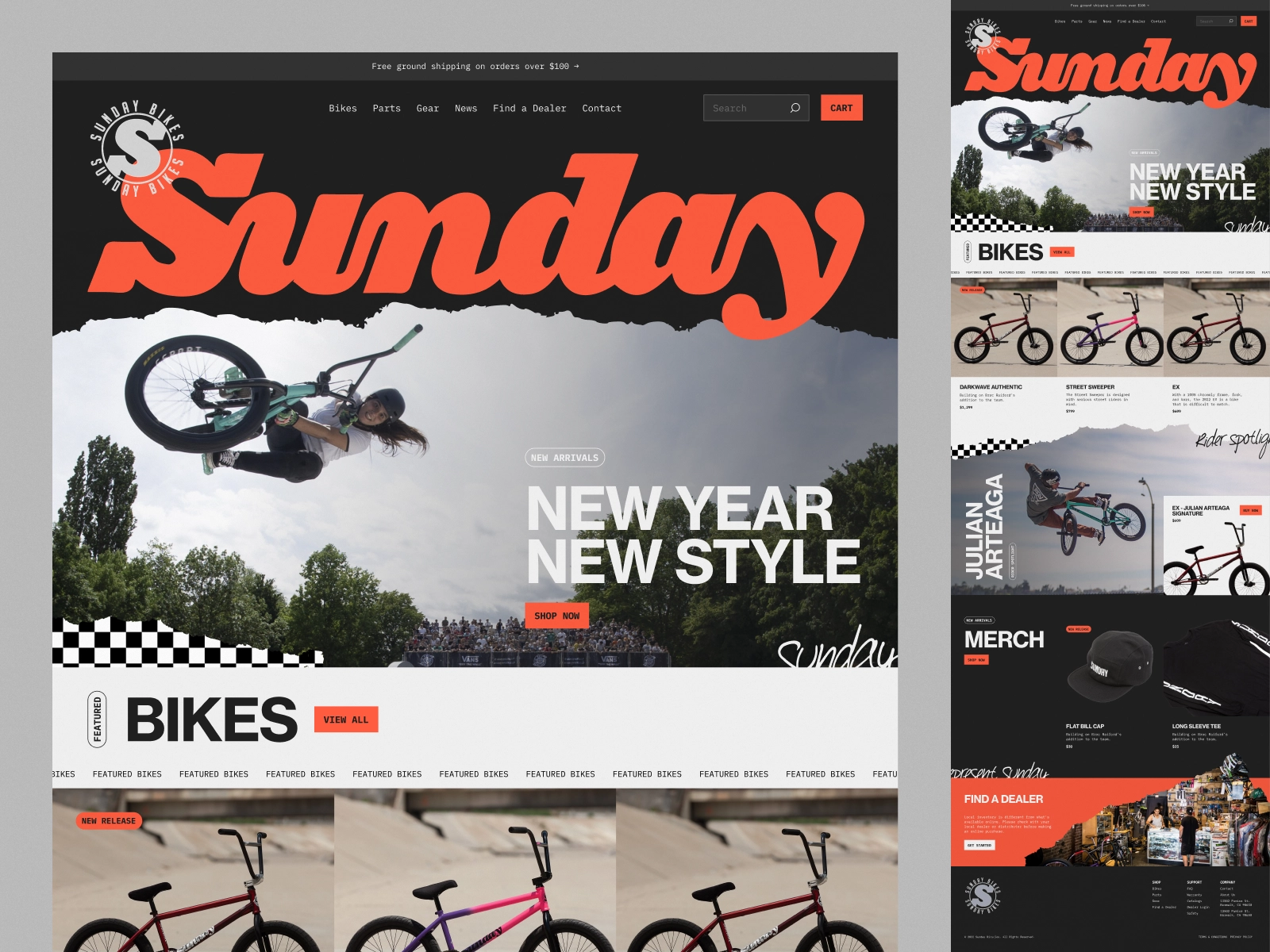
This kind of product page, with editorial-quality photography, custom layout architecture, and smooth scroll interactions, is difficult to achieve in a Shopify theme without significant custom development. In Webflow, a designer builds the layout from scratch using full CSS access. The visual result can be genuinely distinctive rather than recognizable as a theme variant.
For brands where the product experience is part of the brand value, that distinction matters. A $400 product page that looks like every other Shopify theme signals something different than a $400 product page that looks considered and crafted.
Consider a brand scaling from 50 to 500 SKUs. At 50 SKUs, Webflow's ecommerce handles inventory, variants, and checkout cleanly. At 500 SKUs, the catalog management overhead in Webflow becomes significant: variant management, inventory syncing, and bulk updates that take minutes in Shopify can take much longer in Webflow's interface.
For that brand, the hybrid approach makes the most sense: keep the brand site and editorial content in Webflow (where the design advantages are clear), migrate the product catalog and checkout to Shopify (where the commerce infrastructure is purpose-built), and connect the two via the Shopify Storefront API or a simple link structure.
Before committing to Webflow ecommerce, Shopify, or the hybrid approach, answer these questions honestly:
How many SKUs do you expect to have in two years? If the answer is "potentially thousands," start with Shopify's commerce infrastructure. The cost of migrating later is higher than building on the right platform from the start.
Is design a competitive differentiator for your brand? For luxury, premium, or design-forward products, yes. For commodity products competing on price and selection, design is less important than commerce operations.
Does your team have the bandwidth to manage two platforms? The hybrid approach is operationally more complex. If you're a small team running everything, simplicity has real value.
What does your checkout experience need to do? If you need subscription billing, complex discount logic, gift cards, or POS integration, Shopify handles this natively. Webflow requires third-party integrations or workarounds.
Getting clear on these four questions narrows the decision considerably.
Hire a team of top level professionals for less money than hiring a single designer. Stupid simple design subscription service to level-up your business!
Looking forward to potentially working with ya ✌️


